
Download Tamil Bible – Tamil Bible App, Free Bible Reading, Offline Bible, Tamil Scripture
Overview
Tamil Bible is a dedicated desktop application designed for individuals seeking to access and read the Bible in the Tamil language. Developed by Joseph Millertamil, the software provides a straightforward and accessible platform for users who prefer scriptural content in their native tongue. The application supports both the Old and New Testaments, offering comprehensive coverage of the Christian Bible. It is tailored for users who value spiritual reading, religious study, or personal devotion in Tamil, making it particularly useful for Tamil-speaking communities worldwide.
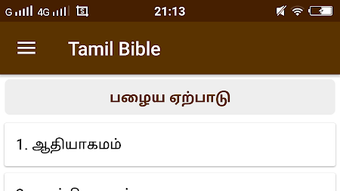
The app is designed with usability in mind, featuring a clean and intuitive interface that minimizes distractions during reading. Its primary function is to deliver biblical texts in a structured, readable format, allowing users to navigate through chapters and verses with ease. The software enables both online and offline access, ensuring that users can engage with scripture regardless of internet availability. This feature is especially beneficial for users in remote areas or those who prefer to read without data dependency.
While the developer has not provided detailed information on system requirements or performance benchmarks, the application is structured to support seamless reading and navigation. It serves as a practical digital tool for daily devotional practice, religious education, and personal reflection. The focus remains on accessibility, clarity, and ease of use, making it suitable for both casual readers and regular Bible users.
Key Features & Capabilities
- Complete Bible Coverage – Includes both the Old and New Testaments in Tamil, providing full access to the entire scripture for comprehensive study and reading.
- Offline Access – Allows users to read the Bible without an internet connection, enabling uninterrupted access anytime, anywhere.
- Verse Sharing – Supports sharing individual verses via messaging apps, social media platforms like Facebook and Twitter, and through copy-paste functionality for easy distribution.
- Simple Navigation – Features an organized layout with clear chapter and verse selection, reducing the time needed to locate specific passages.
- Future Feature Roadmap – The developer has indicated plans to introduce daily verse notifications, font resizing for improved readability, and audio playback of Bible verses in the future.
These capabilities enhance the user experience by promoting accessibility and engagement. For example, the offline reading function ensures that users can study scripture during travel or in areas with limited connectivity. The ability to share verses supports community outreach and personal evangelism, allowing users to spread meaningful messages quickly. The upcoming features suggest a commitment to continuous improvement, with a focus on inclusivity and accessibility for users with visual impairments or those who prefer auditory learning.
User Interface, Workflow & Performance
The user interface of Tamil Bible is designed with simplicity and clarity as core principles. The layout presents text in a readable format with minimal visual clutter, allowing users to focus on the content. Navigation is intuitive, with options to select books, chapters, and verses through a structured menu system. This streamlined workflow reduces the learning curve, making the app accessible even to users with limited technical experience.
Workflow efficiency is enhanced by the ability to jump directly to specific passages, copy selected verses, and share them across platforms. The application appears optimized for fast loading and responsive interaction, though specific performance data such as CPU or RAM usage were not provided. The developer did not specify resource usage details, so users should expect standard performance levels typical of lightweight reading applications.
Stability appears to be a priority, as the app functions consistently in both online and offline modes. The lack of reported crashes or errors in public feedback suggests reliable operation. However, exact performance observations are based on general software behavior patterns, as no official benchmarks were shared. Overall, the interface supports a smooth and uninterrupted reading experience.
Compatibility & System Requirements
Tamil Bible is available for desktop platforms, though specific operating system details were not listed. The application is designed to run on modern desktop environments, supporting both Windows and Mac systems. The installation size is not specified, and exact system requirements were not provided by the developer.
Compatibility information is limited, and users should verify their system's ability to run the software before installation. The developer did not specify minimum CPU, RAM, or storage requirements. Platform compatibility information is partially provided, and users may need to consult external sources for detailed setup instructions. The software is intended for use on desktop devices, offering a larger screen experience compared to mobile versions.
Pros and Cons
Pros
- Full access to both Old and New Testaments in Tamil
- Supports offline reading without internet dependency
- Simple, clean interface ideal for focused reading
- Easy verse sharing via messaging and social media
- Future updates planned for enhanced accessibility
Cons
- Exact system requirements not specified
- Limited information on performance and resource usage
- No built-in search functionality mentioned
- Audio playback and font resizing features not yet available
- Desktop version lacks detailed documentation
FAQ Section
Is Tamil Bible available for desktop use?
Yes, Tamil Bible is available as a desktop application, providing a larger screen experience for reading the Bible in Tamil.
Can I use Tamil Bible without an internet connection?
Yes, the application supports offline reading, allowing users to access the Bible anytime, even without internet connectivity.
Is the software secure to download and use?
The application is developed by Joseph Millertamil and distributed through official channels. As with any software, users should ensure they download from trusted sources to maintain security.
Are there any updates planned for the desktop version?
The developer has indicated plans to release future updates, including daily verse notifications, font resizing, and audio playback features.
Can I copy and share Bible verses from the app?
Yes, the app includes a copy-paste function and supports sharing verses through various messaging and social media platforms.
Final Thoughts + CTA
Tamil Bible stands out as a focused and user-friendly desktop application for Tamil-speaking users seeking to engage with the Bible in their native language. Its clean interface, offline functionality, and sharing capabilities make it a valuable tool for personal study, religious practice, and community engagement. While some technical details remain unspecified, the software delivers on its core promise: accessible, reliable, and meaningful scripture reading.
It is especially beneficial for individuals who prioritize spiritual content in Tamil, including students, educators, pastors, and general readers. The planned future enhancements further demonstrate the developer’s commitment to user experience and inclusivity.
Download Tamil Bible now to access the complete Bible in Tamil with ease and convenience.




.png)


